
For macOS · Version 1.2
Many Agents.One Window.
A native Mac app for running a team of coding agents at once. One CLI process per tab, tabs grouped by project, and an orchestrator tab that hands work to the rest. It drives the same claude and codex CLIs you already sign in to, and shows the page or app they're building right beside the conversation.
macOS 14 or later · 14-day free trial, no account needed
What you need: Claude Code with a Claude subscription (Pro or Max) or an Anthropic API key. Codex is optional.
- Platform
- macOS 14 or later
- Backends
- Claude Code · Codex
- Roles
- Orchestrator · Thinker · Worker · Reviewer
- Billing
- Your own subscriptions
How it works
A project board where every tab is an agent.
One tab, one process
Every tab runs its own CLI session. Tabs are grouped by project, so twelve agents across four repos still read as four rows.
An orchestrator per project
One tab holds the plan and dispatches the work: it opens tabs, sends each one its brief, and collects what comes back.
Roles decide who does what
A Thinker makes the decisions and picks apart the hard bugs. A Worker does the mechanical half. A Reviewer reads the result, read-only, and ends with a verdict.
Each role picks its model
Bind a role to a backend, a model and an effort, so the expensive model reasons and the cheaper one types. Claude or Codex, per role.
Web | iOS
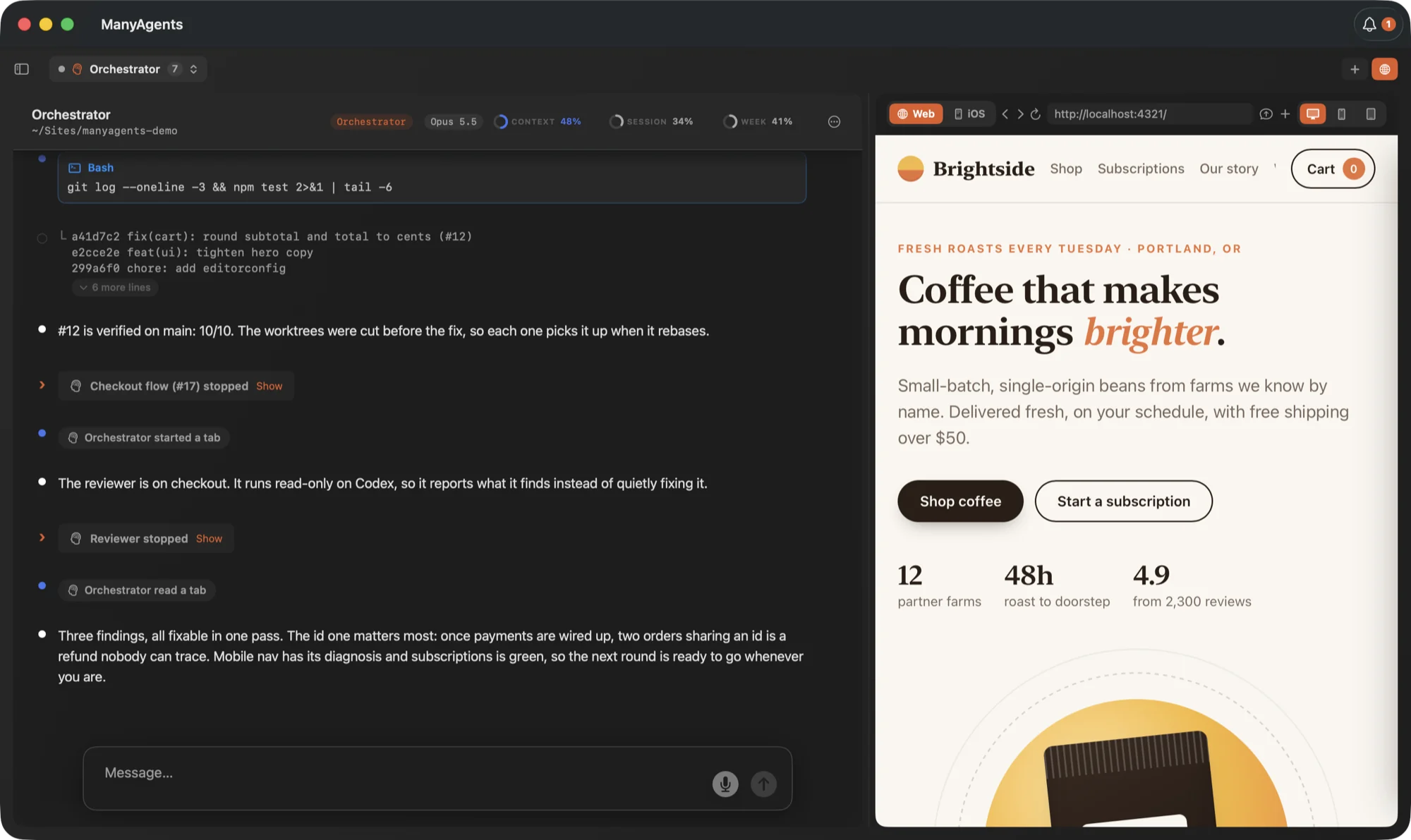
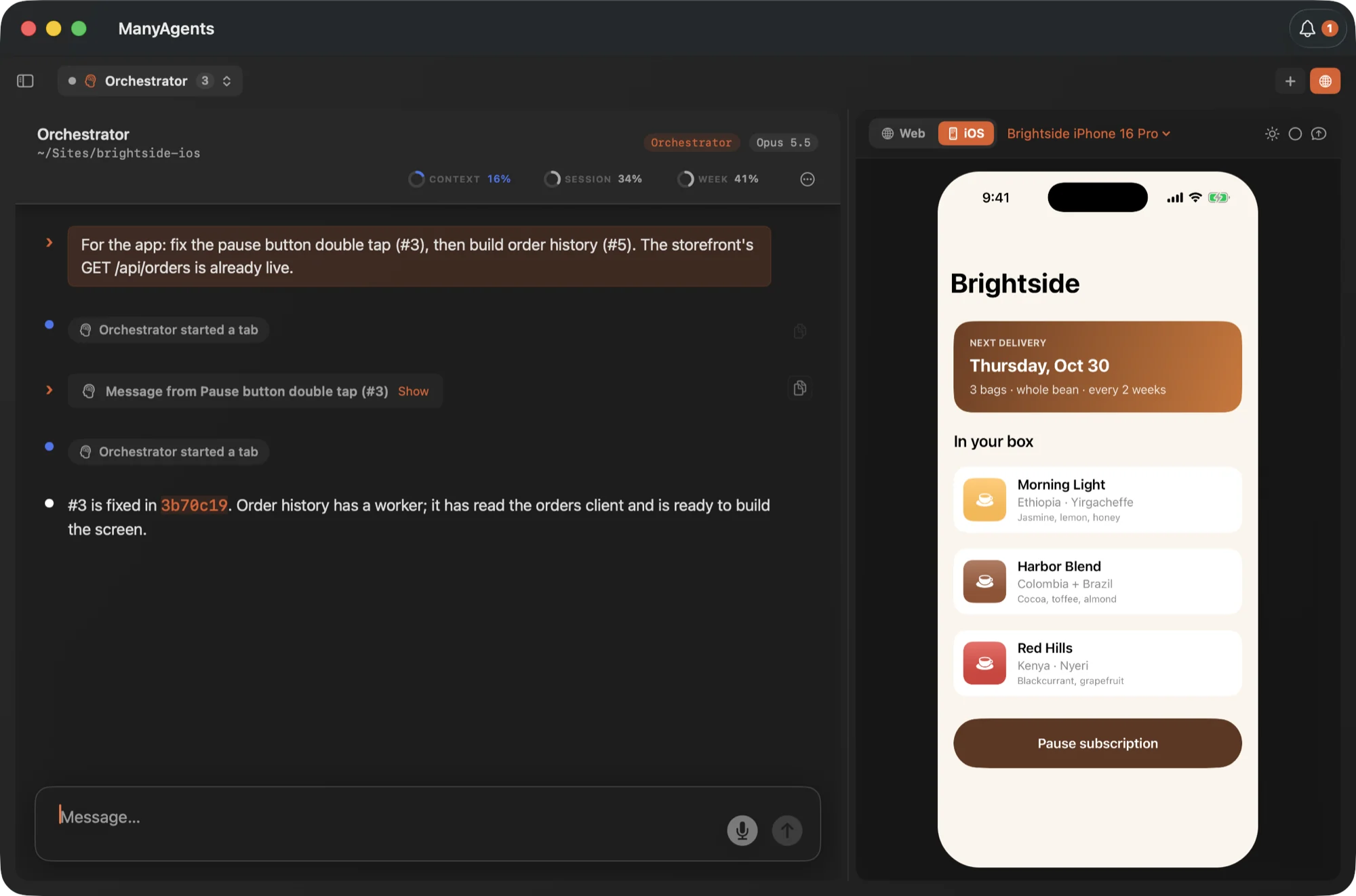
See the web page or the iOS app you're building, live, beside the agent that's building it.
The globe button opens a preview panel next to the conversation. Flip its switch between a live web page and a live iOS Simulator. You can click, tap, scroll and type into either one from the Mac, and the agents can drive it and take screenshots of it too.
A browser the agents can drive
The page loads from your dev server. Agents can open it, click through it and screenshot it to check their own work. Desktop, iPhone or iPad size.
The iOS Simulator, in the panel
Pick a simulator and it runs beside the chat. Tap, scroll and type into it with the mouse and keyboard, without switching windows.
Show the agent what you see
Send what's in the panel to the chat in one click, so the agent is looking at the same screen you are.
Needs you
Questions from every tab land in one drawer.
When an agent needs a decision, the bell in the title bar counts it and the drawer holds it, with the agent's own recommendation and how long it has been waiting. Nothing hides in a tab you aren't looking at.
Add refresh token rotation. Keep existing sessions working, then send the diff to the Reviewer.
12 more linesCollapse
}

async function findSession(token) {
  const hash = hashToken(token)
  return sessions.findByHash(hash)
}

function issueAccessToken(userId) {
  return sign({ sub: userId }, secret, {
    expiresIn: '15m',
  })
}Ship rotation behind a flag, or turn it on for everyone?
Behind a flag for one release.
Revoke the old refresh tokens now, or let them expire on their own?
Let them expire. They last seven days.
Show it, don't describe it
Paste a screenshot straight into the chat.
Press ⌘V in any tab and the image lands in the composer as a thumbnail. Up to eight at a time, with a message or without one. Images copied in Finder work too.
Tax is rounded per line, then summed. $24.01 should be $24.00. Fixing it in the cart.
Or see them all at once
Card view: every agent across every project.
Switch with ⌘⇧L to see the whole workspace at a glance. Each card shows its status, the last prompt and reply, and how much it has used. Agents waiting on you sort to the top.
Add refresh token rotation. Keep existing sessions working.
Revoke the old refresh tokens now, or let them expire on their own?
Review the refresh token diff and check for missing tests.
Verdict: fix these. Add a token reuse test before this is accepted.
Coordinate the refresh token plan, implementation and review.
The Worker is implementing. The Reviewer will check the diff.
The total is a cent off on this order.
Fixed: tax is now rounded once per order. Tests pass.
Usage you can read
Every tab header shows its context and your plan limits as rings. The Usage window breaks the spend down by project, model and role, so you can see what the split of work is buying.
Dev servers, accounted for
Servers the agents started and left running show up in the Needs you drawer, so a forgotten one doesn't sit there all day on your battery.
A worktree per task
The orchestrator cuts a git worktree per parallel task so agents never fight over one checkout. The sidebar nests them under their repo.
Built for long runs
A board that keeps going all day.
Switch models mid-conversation
Move a tab from Claude to Codex or back. The outgoing model writes a handover brief and the incoming one picks up from it.
A guard on your plan limits
Near the end of a plan's limit, it offers to move the work to your other subscription, and hands over or pauses before a tab hits the wall.
Optimize Mode
Tabs roll their context into a fresh working brief well before the window fills, so every call re-reads less. The scrollback stays put.
Overlap detection
When two tabs touch the same files on different branches, both get flagged before the merge does it for you. A tab can claim the paths it owns.
Reviews that end in a verdict
A Reviewer returns a table of what to change, where and how serious, then accept, fix these, or escalate. The orchestrator hands it straight on.
Tidy board
One click closes the tabs that finished hours ago and compacts the quiet ones that are carrying a lot of context.
Get started
Four steps to your first tab.
Download and open
Drag ManyAgents to Applications and open it. The trial starts there: 14 days, no account, no card.
Sign in to Claude Code
If Claude Code isn't installed yet, the app walks you through installing it and signing in with your Claude plan or an API key.
Add Codex, if you like
Optional. Sign in to the Codex CLI and roles can run on either backend, so a Reviewer can be a different model from the one that wrote the code.
Open a project folder
Point it at a repo. You get an orchestrator tab for that project; tell it what you want done and it opens the rest.
What you need: Claude Code with a Claude subscription (Pro or Max) or an Anthropic API key. Codex is optional.
iPhone companion · private beta
Your projects, in your pocket.
Agents keep working while you're away from the Mac. Each project gets a helper on the phone that reads the live board and asks the orchestrator for you. Type to it, send it a screenshot, or just call it. The iPhone app is invite-only for now, through TestFlight.
Checkout totals is chasing a rounding bug. Subscription pause is in review with the Reviewer.
Yes. Tax was rounded per line. The fix is in, tests pass, and it's on its way to review.
Answer what's blocking
A question stops a tab dead. Answer it from the phone and the run carries on.
Talk to it like a call
A real voice conversation you can interrupt. It answers in a sentence or two and never reads code aloud. Runs on your own ElevenLabs key.
Usage at a glance
Your Claude and Codex plan limits, today's and this week's tokens, and how full the orchestrator's context is.
An encrypted relay
The relay pairs your Mac and phone by QR code and forwards sealed messages it cannot open. Your code never lands on it.
Questions
Before you download
- What do I need?
- A Mac on macOS 14 or later, and Claude Code with either a Claude subscription (Pro or Max) or an Anthropic API key. Codex is optional.
- What happens after the 14 days?
- Sending messages and starting new agents pause until you add a license. Reading, exporting and Settings keep working. To buy one, email hello@ailogy.co and we send a license file back; import it in Settings.
- Is my code sent anywhere?
- Not to us. The agents run on your Mac through your own Claude Code and Codex CLIs, so your prompts and code go only where those tools already send them, under your own accounts. ManyAgents has no analytics, telemetry or crash reporting. The privacy policy has the details.
- Do agents ask before running commands?
- Not by default: agents run commands and edit files without stopping to ask each time, which is what lets a board run for hours. If you'd rather approve each one, turn on “Ask before agents run commands or edit files” in Settings and new Claude tabs use Claude Code's normal Allow or Deny prompts. Reviewers are read-only either way.
- How do I get the iPhone app?
- It's in private beta through TestFlight. Email us and we'll send an invite. It pairs with the Mac app by QR code.

Native on the Mac. Runs on your own plans. Free for 14 days.
ManyAgents signs in through the Claude Code and Codex CLIs, so the work bills to the subscriptions you already pay for. Made by AILOGY, and used there every day.
macOS 14 or later · 14-day free trial, no account needed